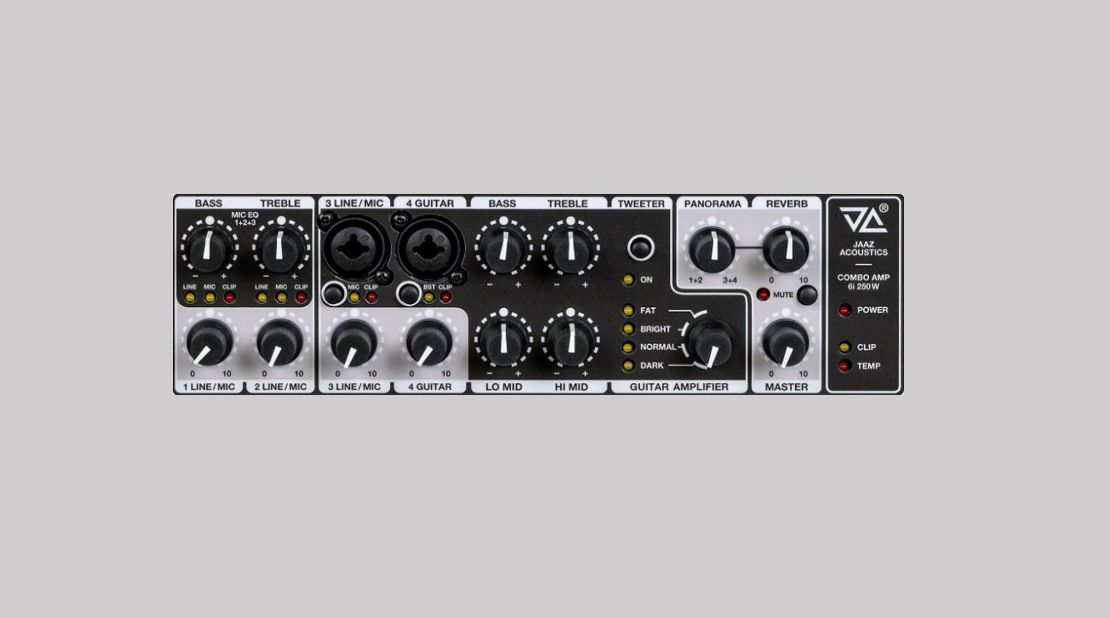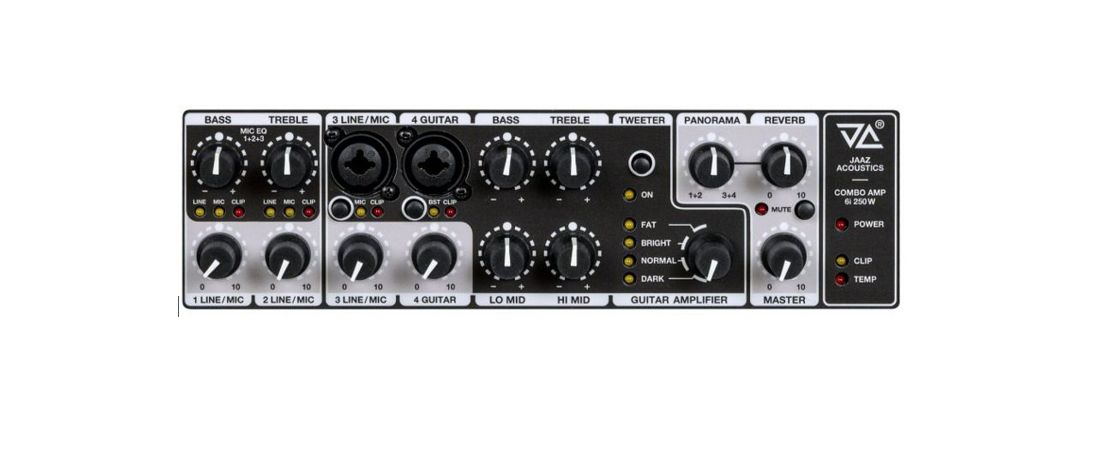

Getting Started, Default Settings for Jaaz Acoustics Amplifier Controls for Connecting Acoustic and Electric Instruments
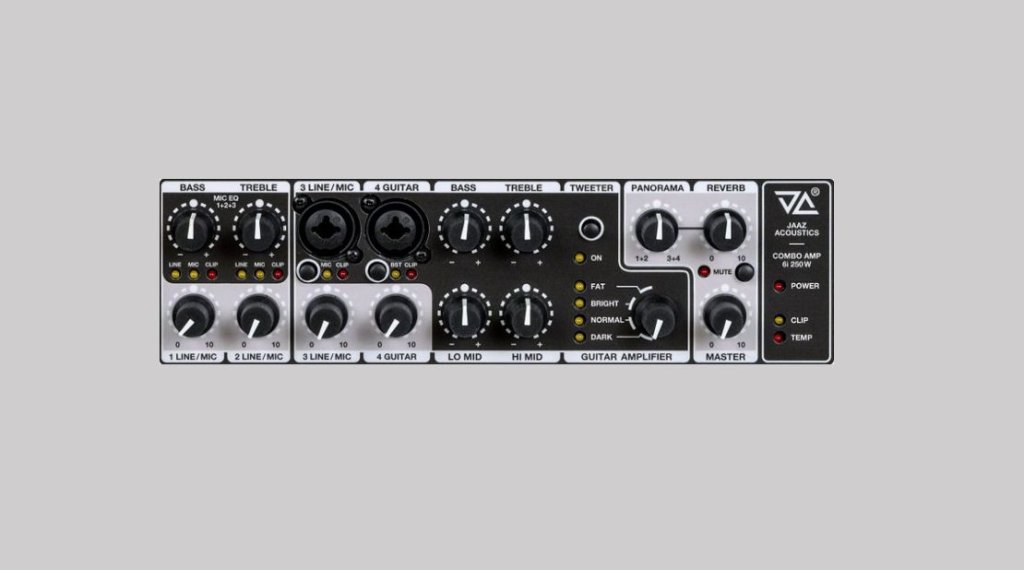
Default settings of Jaaz Acoustics amplifier controls for connecting acoustic and electric instruments
If you have become a first-time user of one of the Jaaz Acoustic 6i series amplifiers, you can try the following initial procedure to obtain the desired sound character. Jaaz Acoustics amplifiers have several significant features.
FRDC loudspeakers used in acoustic combo amplifiers are single source-point drivers with crystal-clear sound across the entire frequency range. This type of loudspeaker uncompromisingly and faithfully interprets the input signal, just as a brush on a white canvas faithfully and uncompromisingly interprets the artistic intent of the performer.
Peak amplifier power of 350 W without a compressor. High power without compression distortion provides exceptional headroom before power clipping occurs. Maximum headroom is especially beneficial for dynamic percussive–melodic instruments such as flamenco or gypsy jazz guitars, pianos, and other acoustic instruments with high playing dynamics and high signal levels during string attack.
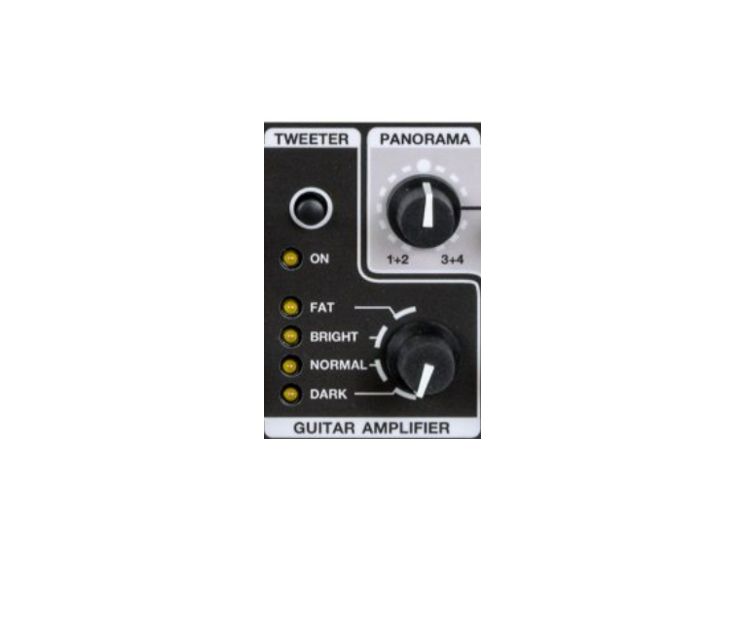
The amplifiers are equipped with an AMP selector sound character switch, which appropriately creates a preliminary EQ for various acoustic and electric musical instruments.
Built-in Twin Gumbar Sparkle Boost with a dynamic nonlinear transfer characteristic for coloring the basic sound with harmonic overtones.
1. Acoustic guitar – basic default setting for all 6i types (6 inputs)
Acoustic guitar connected to input 3.
Set all EQ controls of the instrument section (inputs 3 and 4) to 12:00. JA amplifiers are designed to provide a very balanced and faithful instrument sound in this position.
Tweeter switch ON
AMP selector set to Normal
BST switch at input 4 (harmonic overtones) OFF
Mic switch at input 3 OFF
EQ for microphone and line inputs 1 and 2 set to 12:00
Volume 1 and 2 set to 0
Volume/Gain, start at a low level and gradually increase. Set Volume for input 3 between 9:00 and 11:00 so that the red clip LED does not light continuously (it may flash occasionally).
Reverb, for initial setup, set to 9:00 for a subtle spatial effect. Typical use is between 9:00 and 12:00.
2. Acoustic guitar – basic sound character adjustment using the AMP selector
Using the AMP selector, try the position that best suits your desired sound character. For each AMP selector position, also try switching the Tweeter OFF to understand the influence of high frequencies on the overall sound character.
FAT position gives the guitar more body; the sound is often suitable for acoustic archtop guitars. The tweeter can also be switched off to obtain a “round” tone without overtones.
Bright position gives the instrument more brilliance and overtones, suitable for single-coil pickups on Strat- and Tele-type guitars.
Normal position provides a natural and brilliant sound, often suitable for acoustic guitars.
Dark position gives the instrument body and low frequencies; the transfer characteristic is balanced.
3. Acoustic guitar – fine adjustment using frequency-based EQ controls
If the sound setting achieved with the AMP selector does not fully meet your requirements, fine-tune the sound character using the individual EQ controls:
Bass 100 Hz: Controls bass and the “body of the instrument” (mainly the E and A strings on the guitar). If the sound is “boomy,” reduce the control to 9:00.
Lo Mid 420 Hz: Key for guitar presence. For a classic jazz sound, some players slightly reduce the mids (so-called scoop), while others leave them centered for a more defined tone.
Hi Mid 1200 Hz: Key for guitar presence. For a classic jazz sound, some players slightly reduce the mids (so-called scoop), while others leave them centered for a more defined tone.
Treble 4000 Hz: Controls brilliance and harmonic overtones. If you use an archtop guitar and want a more “woody” sound, you can switch off brilliance and overtones using the Tweeter switch.
4. Acoustic guitar in input 3 and physiological shelving EQ selection
If you have an acoustic guitar connected to input 3, if you turn on the switch marked MIC, the guitar will increase its volume and at the same time the 4-band corrections will switch to very physiological shelving corrections of Bass and Treble, marked mic 1+2+3. Sometimes it is more advantageous to use physiological corrections, which better suit human physiology according to ISO 226/2003, for acoustic instruments. Try the influence of physiological EQ controls on the overall sound character.
5. Electric guitar – basic default setting for all 6i types (6 inputs)
Electric guitar connected to input 4.
Set all EQ controls of the instrument section (inputs 3 and 4) to 12:00. JA amplifiers are designed to provide a very balanced and faithful instrument sound in this position.
Tweeter switch ON
AMP selector set to Normal
BST switch at input 4 (harmonic overtones) OFF
Mic switch at input 3 OFF
EQ for microphone and line inputs 1 and 2 set to 12:00
Volume 1 and 2 set to 0
Volume/Gain: Start at a low level and gradually increase. Set Volume for input 3 between 9:00 and 11:00 so that the red clip LED does not light continuously (it may flash occasionally).
Reverb: For initial setup, set to 9:00 for a subtle spatial effect. Typical use is between 9:00 and 12:00.
6. Electric guitar – basic sound character adjustment using the AMP selector
Using the AMP selector, try the position that best suits your desired sound character. For each AMP selector position, also try switching the Tweeter OFF to understand the influence of high frequencies on the overall sound character.
FAT position gives the guitar more body; the sound is often suitable for acoustic archtop guitars, jazz guitars, electric guitars with humbuckers, and stompboxes. The tweeter can also be switched off to obtain a “round” tone without overtones.
Bright position gives the instrument more brilliance and overtones for single-coil pickups on Strat- and Tele-type guitars; it can be combined with Tweeter OFF depending on the stompboxes used.
Normal position provides a natural and brilliant sound, often suitable for acoustic guitars.
Dark position gives the instrument body and low frequencies; the transfer characteristic is balanced and usable for various types of jazz guitars.
7. Electric guitar – fine adjustment using frequency-based EQ controls
If the sound setting achieved with the AMP selector does not fully meet your requirements, fine-tune the sound character using the individual EQ controls:
Bass 100 Hz: Controls bass and the “body of the instrument” (mainly the E and A strings on the guitar). If the sound is “boomy,” reduce the control to 9:00.
Lo Mid 420 Hz: Key for guitar presence. For a classic jazz sound, some players slightly reduce the mids (so-called scoop), while others leave them centered for a more defined tone.
Hi Mid 1200 Hz: Key for guitar presence. For a classic jazz sound, some players slightly reduce the mids (so-called scoop), while others leave them centered for a more defined tone.
Treble 4000 Hz: Controls brilliance and harmonic overtones. If you use an archtop guitar and want a more “woody” sound, you can switch off brilliance and overtones using the Tweeter switch.
8. Twin Gumbar Sparkle Boost Switch
By pressing the BST switch you get a basic tone enriched with harmonic overtones, the total distortion with harmonic overtones reaches values up to 10% depending on the position of Volume 4. TG Sparkle boost can be combined very well with compressors and overdrivers such as King of tone, Duke of tone and similar.
9. Tips for specific acoustic situations
Room acoustics correction: In rooms with carpet and low ceilings, slightly increase high frequencies. In acoustically “hard” rooms (concrete, glass, tiles), reduce high frequencies.
Sound radiation: For better sound dispersion and reduction of unwanted boomy bass amplified by the so-called directivity factor due to floor reflection, use the AMP wedge (folding foot on the bottom of the cabinet) or use the side wedge 45°, which screws into the M10 socket for a stand adapter.
Floor placement: Placing the amplifier on the floor provides additional reinforcement around 100–150 Hz of approx. 3 dB (double power). Placing it on the floor and near a wall provides additional reinforcement around 100–150 Hz of approx. 6 dB (triple power).
Gain vs. Master: All JA amplifier models are equipped with Gain and Master controls. Set the Gain so that the signal is not distorted (unless distortion is intentionally desired), and control the overall volume using the Master control.
More detailed information can be found in the Jaaz Acoustics user manual, which is supplied with every device.